Save and restore
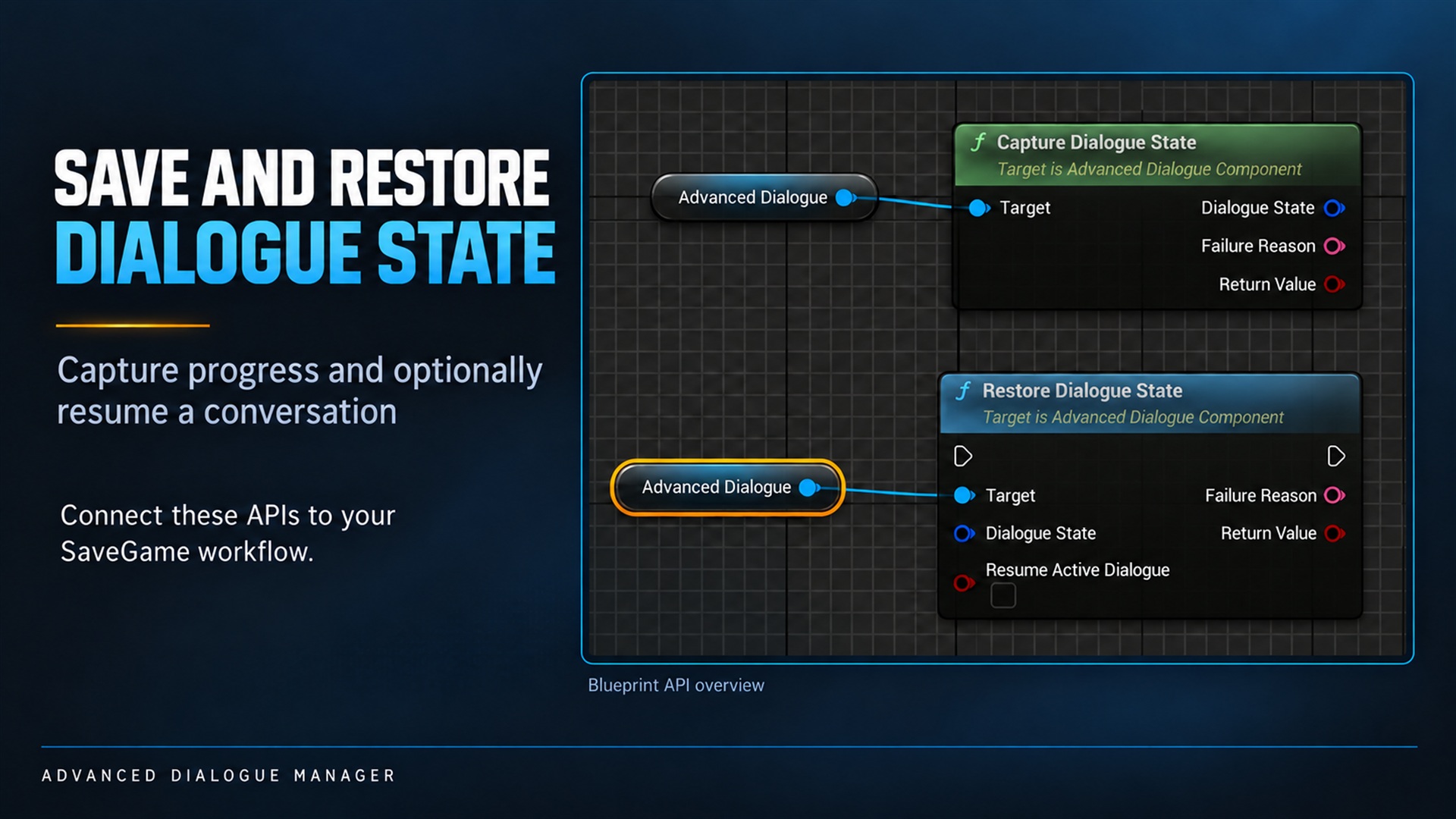
Save and restore. Supplied product gallery image; any captions/overlays are promotional, not interactive controls.
Verification boundary: The ZIP includes implementation and testing source, but this documentation build did not execute an Unreal Engine editor/cooked-game save-and-resume test.
Capture Dialogue State and Restore Dialogue State are implemented in the current source. Their end-to-end shipping validation is pending; do not treat this manual as a test report.
What is captured
Section titled “What is captured”Variables, visit/choice/start/completion memory, current-run history, Selector state and optionally the active conversation position are captured. Active state includes the executing asset, stable node/Sequence-entry ID, Sub-Dialogue return stack, pause state, remaining Delay/signal timeout and held camera-node references.
Actor instances, widgets, audio playback positions, inventory, quests, physical door states and external provider state are not captured.
One-time setup
Section titled “One-time setup”Create your own SaveGame Blueprint, for example SG_AnnaProgress. Add a variable named Dialogue State of type Advanced Dialogue Save State. If your save system filters fields by SaveGame flags, enable SaveGame on the containing property.
Keep the loaded SaveGame object in an owner that survives level travel, such as your Game Instance. A variable on an Actor destroyed during travel will not preserve it.
Get/create SG_AnnaProgress→ Capture Dialogue State (running Dialogue Component)→ Branch on return value True: assign output Dialogue State to SG_AnnaProgress save world/quest data separately Save Game to Slot / Async Save Game to Slot check the save operation's result False: report Failure Reason; preserve the previous valid saveCapture does not write a file or stop dialogue. Call it outside playback/provider callbacks after transitions finish. Stable lines, choices, Delay and Wait for Signal are resumable. An inactive component can still capture progress.
Restore progress only
Section titled “Restore progress only”Load the slot and cast to your SaveGame class. Obtain the destination Dialogue Component. If a conversation is already active, stop it explicitly before restoring.
Call Restore Dialogue State with the stored snapshot and Resume Active Dialogue = false (the default). Check the return value and Failure Reason. This restores progress without opening or scheduling a conversation.
There is no capture flag: capture retains available state. The restore flag decides whether to reopen the saved conversation.
Restore and resume
Section titled “Restore and resume”Load SaveGame and check success→ load the saved level→ wait for level/streamed areas and required Actors to be ready→ restore world, inventory and quest state→ obtain the destination Dialogue Component→ Set Speaker Actor for SP_Anna, SP_Player and other required speakers→ assign event/condition/camera providers and local player→ create/bind the widget and configure input→ stop any existing dialogue explicitly→ Restore Dialogue State (Resume Active Dialogue = true)→ check result / Failure ReasonDo not use a fixed Delay as proof that loading completed. Call after your game’s readiness conditions are satisfied. Restore does not create Actors, load levels or configure UI.
Resume behavior and errors
Section titled “Resume behavior and errors”For a hands-on verification with expected results, follow the step-by-step save test. It includes K (Save) / L (Load) setup, input-mode troubleshooting, progress-only loading and a fresh PIE session.
- The current line’s voice/typewriter restart from the beginning; saved pause is retained.
- Choices are reevaluated against restored gameplay. No visible options can end the path.
- Remaining waits are restored; time outside the game does not consume them.
- Completed Event/Variable nodes are not traversed again just to reconstruct the saved position.
- Held cameras are rebuilt against the new linked Speaker Actors, not old Actor pointers.
- Saved assets are resolved synchronously. Missing assets, changed node types, removed Sequence entries or invalid return points produce a failure.
- Resume does not increment normal start/visit counters merely for restoring that point.
- Progress-only restore does not require the saved active node to still exist.
- Validation failures leave component progress unchanged. A failure caused by a gameplay callback interrupting an already-started resume can happen after progress was restored; read Failure Reason rather than assuming every failure is a rollback.
Save files reference asset paths and GUIDs. Renaming/removing content or reordering stateful branches can require a migration strategy. Ensure assets referenced only by save files are included in cooking.
The format version is internal. Do not hand-edit snapshot contents or assume arbitrary old/new snapshots are compatible.