Speakers and Actors
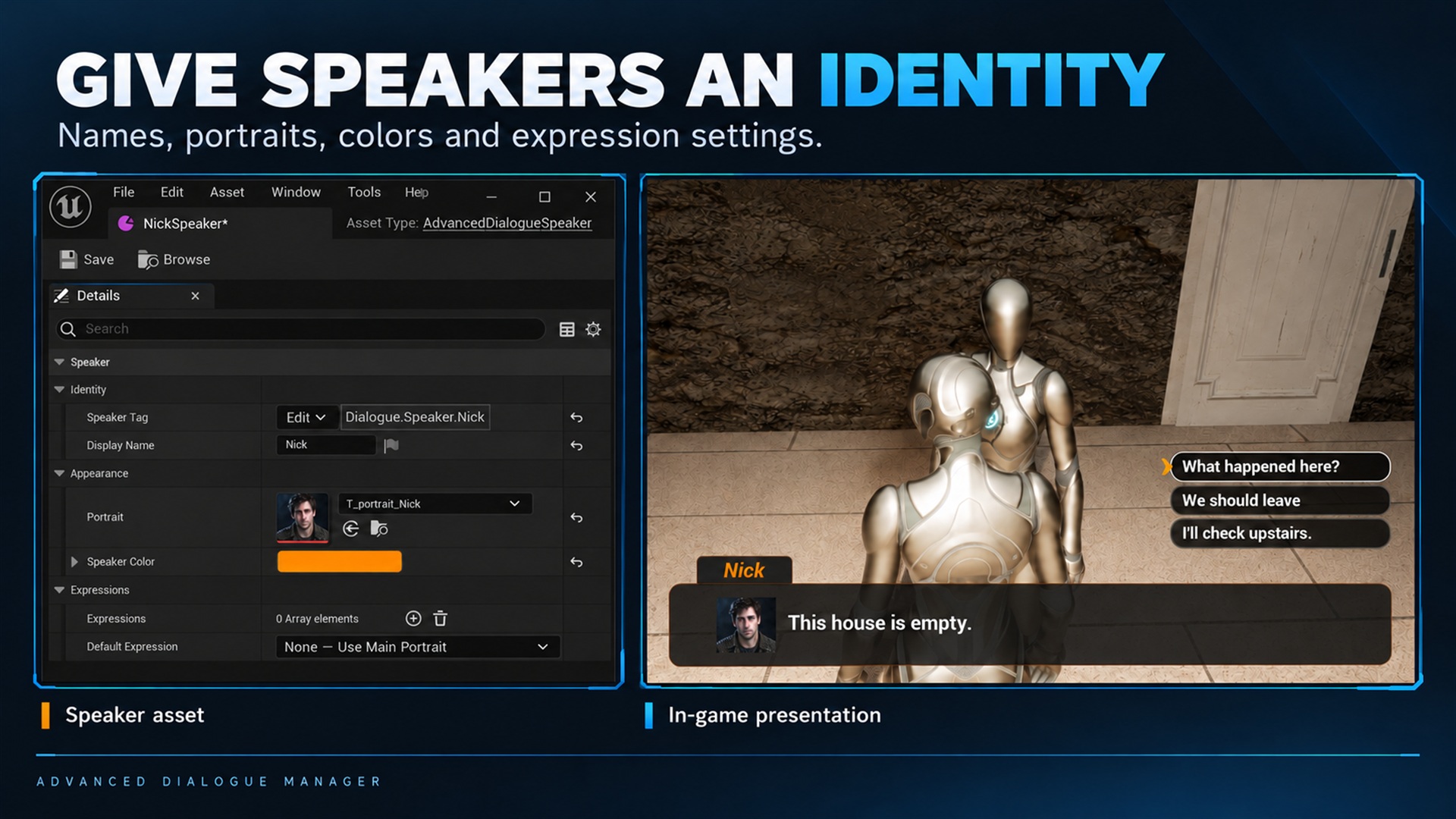
Speakers and Actors. Supplied product gallery image; any captions/overlays are promotional, not interactive controls.
Speaker fields
Section titled “Speaker fields”Create a speaker with Content Browser → right-click → Advanced Dialogue Manager → Speaker. Name it, then double-click to edit it.
| Field | Purpose |
|---|---|
| Speaker Tag | Gameplay Tag identifying the speaker; not the visible name or an Actor lookup |
| Display Name | Visible localized name; falls back to tag text, then asset name |
| Portrait | Base portrait when no expression-specific portrait is available |
| Speaker Color | UI name color when enabled, and speaker accents in the graph |
| Expressions | Expression-tag/portrait pairs |
| Default Expression | Fallback expression selected from Expressions |
Localization identity is maintained by the asset. It is not an Actor identifier.
Optional: link a character in the level
Section titled “Optional: link a character in the level”Speaker = the character’s presentation data. Actor = the character in the level. Text, names and portraits work without an Actor. Link an Actor when a speaker-targeted camera or your gameplay needs it. No extra role tag or enable flag is required.
Before Start Dialogue, call these nodes on the same Dialogue Component:
Set Speaker Actor Speaker: SP_Anna Actor: the Anna Actor instance in the level ↓Set Speaker Actor Speaker: SP_Player Actor: the Player character instance ↓Start DialogueUse the exact Speaker Assets assigned to the dialogue lines. Matching is by asset, not by display name or Gameplay Tag. Pass an Actor instance, not a Blueprint class.
Each call adds a link; registering the same Speaker again replaces only that link. Separate dialogue components have separate links. Get Current Speaker Actor returns the Actor for the current line or Sequence entry. Get Speaker Actor queries any registered Speaker.
Passing None as Actor removes that link. Remove Speaker Actor removes one link; Clear Speaker Actors removes all. Neither destroys Actors nor stops dialogue. Missing or destroyed Actors return None: the plugin never searches the level or substitutes the component owner.
Register links before playback. Updating a link affects subsequent camera requests and line presentations, not an already active camera shot or a previously delivered line-context snapshot.
Links are not saved or replicated automatically. After loading a level, link the new Actors before Restore Dialogue State with Resume Active Dialogue enabled.
Conditions and events
Section titled “Conditions and events”Speaker Actor links do not select gameplay handlers. Under External Logic:
- Condition Handler Source: This Actor uses the component owner; Another Object uses the assigned Condition Handler.
- Event Handler Source: This Actor uses the component owner; Another Object uses the assigned Event Handler.
Handlers must implement the corresponding Condition Provider or Event Provider interface. They may be a character, a Quest Manager or another runtime object. Dialogue-variable conditions do not need an external handler.
Updating existing Blueprints
Section titled “Updating existing Blueprints”The role-based APIs and Speaker character-link fields have been removed, without compatibility wrappers. Replace old registrations with Set Speaker Actor. Recreate affected line-event bindings: their Speaker Actor output is now an Actor reference. Assign Condition Handler and Event Handler for Another Object setups; do not rely on old serialized Context fields.